

Superpower for Claude: Unlock Advanced Features & Productivity
Cara Install Ekstensi Chrome
- Klik tombol "Add to Chrome" di atas.
- Anda akan diarahkan ke Chrome Web Store.
- Klik "Add to Chrome" pada halaman ekstensi.
- Konfirmasi dengan klik "Add Extension" pada popup.
- Ekstensi akan otomatis terpasang dan ikon muncul di toolbar.
- Klik ikon ekstensi di toolbar untuk mulai menggunakan.
Screenshot
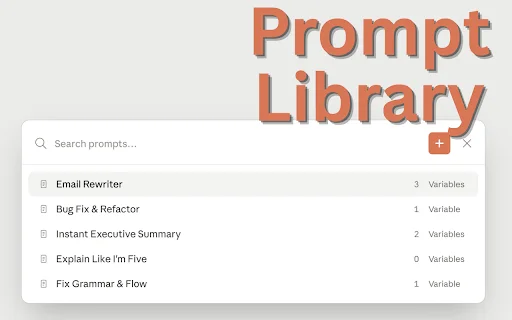
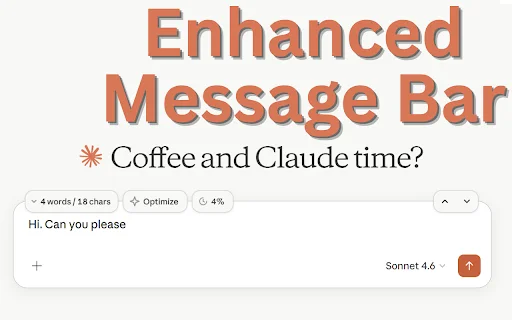
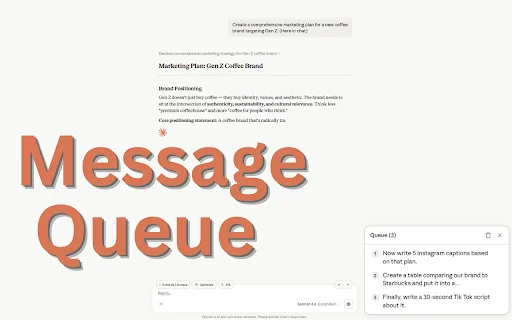
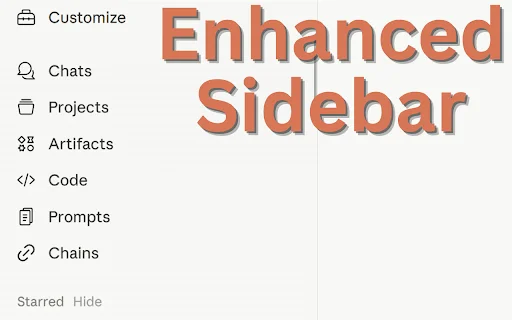

Are you tired of hitting message limits and struggling to organize your AI workflows? Superpower for Claude is the ultimate browser extension designed to supercharge your Claude.ai experience. Whether you are a developer, writer, or power user, this tool bridges the gap between basic functionality and a professional-grade workspace, ensuring you never lose track of your limits or your best ideas.
Built with privacy in mind, this extension runs entirely on your device, giving you total control over your chat environment. From smart message queuing to advanced prompt management and export capabilities, Superpower for Claude transforms your browser into a high-efficiency command center for artificial intelligence.
Key Features
- Precise Limit Tracker: Monitor your 5-hour and 7-day usage limits in real-time.
- Smart Message Queue: Automate your workflow by queuing multiple messages while waiting for responses.
- Prompt Library & Variables: Organize your best prompts with dynamic placeholders and easy reuse.
- Professional Exports: Save your conversations as clean, professional PDF or Markdown files.
- Smart Folders: Keep your sidebar tidy with nested folders and drag-and-drop organization.
- Prompt Chains: Execute multi-step workflows automatically for complex tasks.
- Slash Commands: Use “//” or “,,” to trigger saved prompts and chains instantly.
How to Use
- Install the Superpower for Claude extension from the Chrome Web Store.
- Refresh your Claude.ai tab to load the new sidebar and interface controls.
- Open the settings menu to toggle features like the Limit Tracker or Smart Folders based on your preference.
- Use the slash commands directly in the chat input box to access your saved prompt library.
FAQ
Is Superpower for Claude free to use?
Yes, the core features are available for users to enhance their Claude experience.
Does this extension collect my chat data?
No, this extension is privacy-focused and runs entirely on your local device.
Can I export my chats to PDF?
Yes, the extension includes a professional PDF and Markdown export feature.
Does it work with the free version of Claude?
Yes, it is designed to work with the standard Claude interface to add missing productivity tools.
How do I create a prompt chain?
You can create chains in the extension dashboard to link multiple prompts together for sequential execution.
Ready to take your AI productivity to the next level? Download Superpower for Claude today and gain full control over your chat sessions, organization, and workflows. Join thousands of users who have already upgraded their AI experience.
Users are highly satisfied with the extension, praising its functionality and ease of use.
Kelebihan
- Works perfectly
- Enhances functionality
- User-friendly
Ulasan Pengguna
Works Fine.
Very Nice!
| ID Ekstensi | lmnfidajoddlggdcdebbgcdkojhnfnnb |
|---|---|
| Version | 1.2.2 |
| Size | 0.1 MB |
| Developer | SulfurByte |
| Terakhir Diperbarui | |
| Tanggal Rilis | |
| Jumlah Pengguna | 1.000++ |
| Jumlah Ulasan | 2 |
| Chrome Store Ranking | #31555 |
| Category | Productivity |
| Tipe | Paid |

Adblock for Spotify ডাউনলোড করুন – বিজ্ঞাপন মুক্ত মিউজিক উপভোগ করুন
https://spotiblocker.com

Horizon Timez ডাউনলোড করুন – আপনার ক্রোম ব্রাউজারের জন্য সেরা থিম
Innovirtual Pte. Ltd.

Work Offline ডাউনলোড করুন – ব্রাউজারে অফলাইন মোড ব্যবহার করুন
emano.waldeck

Smodin AI Detector: আপনার লেখাকে করুন আরও নির্ভুল ও মানবিক
https://smodin.io

Hide Tabs (Panic Button) ডাউনলোড করুন – দ্রুত ট্যাব লুকান
Yubi

Supercut ডাউনলোড করুন – দ্রুত স্ক্রিন ও ক্যামেরা রেকর্ডার
https://supercut.ai