

Galaxy: Ultimate Multi-Account Manager for ByteDance Ad Testing
liuyuan.renard
Cara Install Ekstensi Chrome
- Klik tombol "Add to Chrome" di atas.
- Anda akan diarahkan ke Chrome Web Store.
- Klik "Add to Chrome" pada halaman ekstensi.
- Konfirmasi dengan klik "Add Extension" pada popup.
- Ekstensi akan otomatis terpasang dan ikon muncul di toolbar.
- Klik ikon ekstensi di toolbar untuk mulai menggunakan.
Screenshot
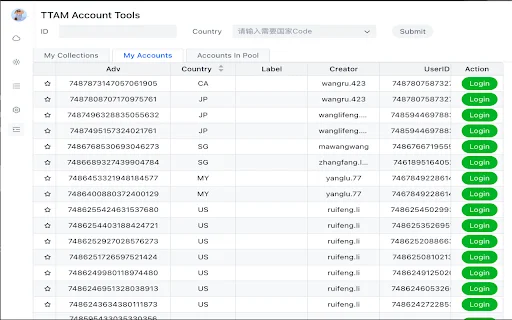
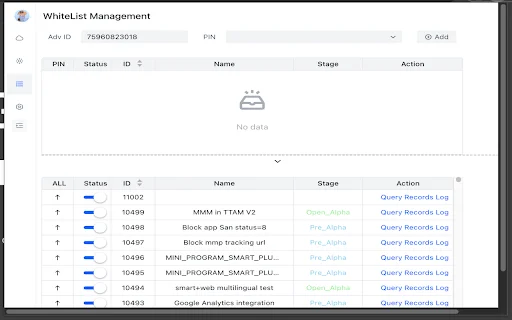
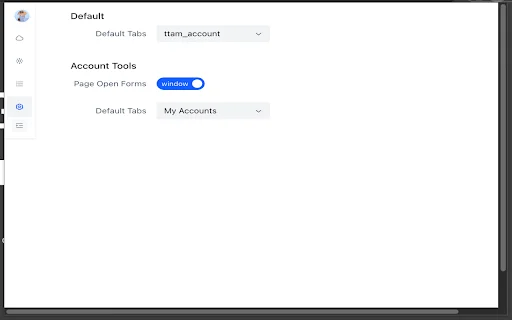
Are you a professional ad tester struggling to manage dozens of ByteDance advertising accounts across different regions? The Galaxy Chrome extension is designed specifically to streamline your workflow, offering a centralized hub that eliminates the need for constant tab switching and manual data entry. Whether you are handling regional campaigns or managing massive account pools, Galaxy provides the precision and speed required to excel in high-pressure testing environments.
For testers in the United States and global markets, efficiency is the currency of success. Galaxy transforms your browser into a powerhouse productivity tool by automating login processes and aggregating seller data. By reducing the friction of account management, this extension allows you to focus on what really matters: optimizing ad performance and achieving better ROI without getting bogged down by administrative bottlenecks.
Key Features
- Centralized Account Dashboard: View seller IDs, countries, tags, creators, and user IDs in one clean interface.
- Smart Account Bookmarking: Star your most important or frequently used accounts for instant access.
- One-Click Rapid Login: Automate the login process with cookie handling to bypass manual credential entry.
- Advanced Data Filtering: Search and filter accounts by ID, country, or user criteria to find exactly what you need.
- Multi-Source Integration: Seamlessly pull account data from your personal pools and internal databases.
- Country-Based Sorting: Organize your account list alphabetically by country for faster navigation.
- Cross-Page Sync: Your saved preferences and bookmarks persist across different browser sessions.
- User-Friendly Interface: A clean, intuitive design that ensures a shallow learning curve for all testers.
How to Use
- Install the Galaxy extension from the Chrome Web Store and pin it to your toolbar.
- Click the extension icon to open the dashboard and connect your desired data sources.
- Use the search bar and filter criteria to locate the specific account you need to manage.
- Click the “Login” button next to any account to automatically authenticate and launch your session.
- Manage your favorites by clicking the star icon to keep your most vital accounts at your fingertips.
FAQ
Is Galaxy safe to use for managing ad accounts?
Yes, Galaxy is built with security in mind. It simplifies the login process by handling cookies locally, ensuring your credentials remain protected while you work.
Can I sync my bookmarks across different devices?
Yes, Galaxy supports synchronized bookmarking, allowing you to access your favorite accounts consistently across different browser sessions.
Does this extension support multiple data sources?
Absolutely. Galaxy is designed to integrate with various internal and external data sources, allowing for a comprehensive view of your account pool.
What should I do if the extension fails to log in?
First, ensure you have the latest version of the extension installed. If issues persist, try reloading the extension or checking your network connection.
Who is this extension primarily for?
Galaxy is built specifically for ByteDance advertising testing departments and professionals who handle multiple ad accounts simultaneously.
Stop wasting time on repetitive login tasks and fragmented account management. Elevate your productivity to the next level by integrating Galaxy into your daily workflow today. Download Galaxy now and take full control of your advertising ecosystem with ease!
Galaxy is a highly specialized tool for ad testers, currently maintaining a perfect rating due to its focus on efficiency and account management.
Kelebihan
- Streamlined account management
- Efficient one-click login
- Powerful data filtering tools
- Intuitive user interface
Kekurangan
- Limited number of user reviews
- Requires specific testing environment setup
| ID Ekstensi | eckeiigonnenofmnaoldiljpieghajjp |
|---|---|
| Version | 1.10.16 |
| Size | 0.7 MB |
| Developer | liuyuan.renard |
| Terakhir Diperbarui | |
| Tanggal Rilis | |
| Jumlah Pengguna | 1.000++ |
| Jumlah Ulasan | 1 |
| Chrome Store Ranking | #32617 |
| Category | Productivity |
| Tipe | Free |

ALS eLog Book ডাউনলোড করুন – সেরা HOS রেকর্ডিং সমাধান
Vismaad Tech Inc

YUYI-NewTab ডাউনলোড করুন – সেরা কাস্টমাইজযোগ্য ব্রাউজার হোমপেজ
寓义

Elden Email ডাউনলোড করুন – আপনার ইমেইলে এলডেন রিংয়ের ছোঁয়া
mettignis

PasswordPocket ডাউনলোড করুন – ব্লুটুথ চালিত সেরা পাসওয়ার্ড ম্যানেজার
https://atlancube.com

Reczee Wand ডাউনলোড করুন – সেরা রিক্রুটমেন্ট অটোমেশন টুল
https://reczee.com

Healthvista Clinicians ডাউনলোড করুন – ক্লিনিকাল ম্যানেজমেন্ট অ্যাপ
Healthvista India Pvt. Ltd.